Case study
Audit Helper.
Your auditor's software knows what they asked for. It has no idea who on your side is doing it. So we added that — to their page, without touching their system.
- Product
- Audit Helper — Chrome extension
- Scope
- Extension, Apps Script backend, reminder system, Web Store packaging
- Stack
- Chrome MV3 · vanilla JS · Google Apps Script · Google Sheets
- Audience
- Client-side finance teams in an external audit
The problem: two halves of one job
An external audit starts with a request list — dozens of items, each with a date the auditor wants it by. The CCH Axcess Engagement Organizer holds that list beautifully. What it does not hold is the half of the work that happens on the client's side: who is pulling the trial balance, who owns the bank recs, and when those are due internally, which is always earlier than the date the auditor wrote down.
So that half lives in a spreadsheet nobody updates, or in a director's head. Every status check becomes a meeting. Items go quiet until the day they're late.
The obvious fix — put assignment into the audit software — isn't available. It's the auditor's system, licensed by the firm, and the client can't change it.
What we built
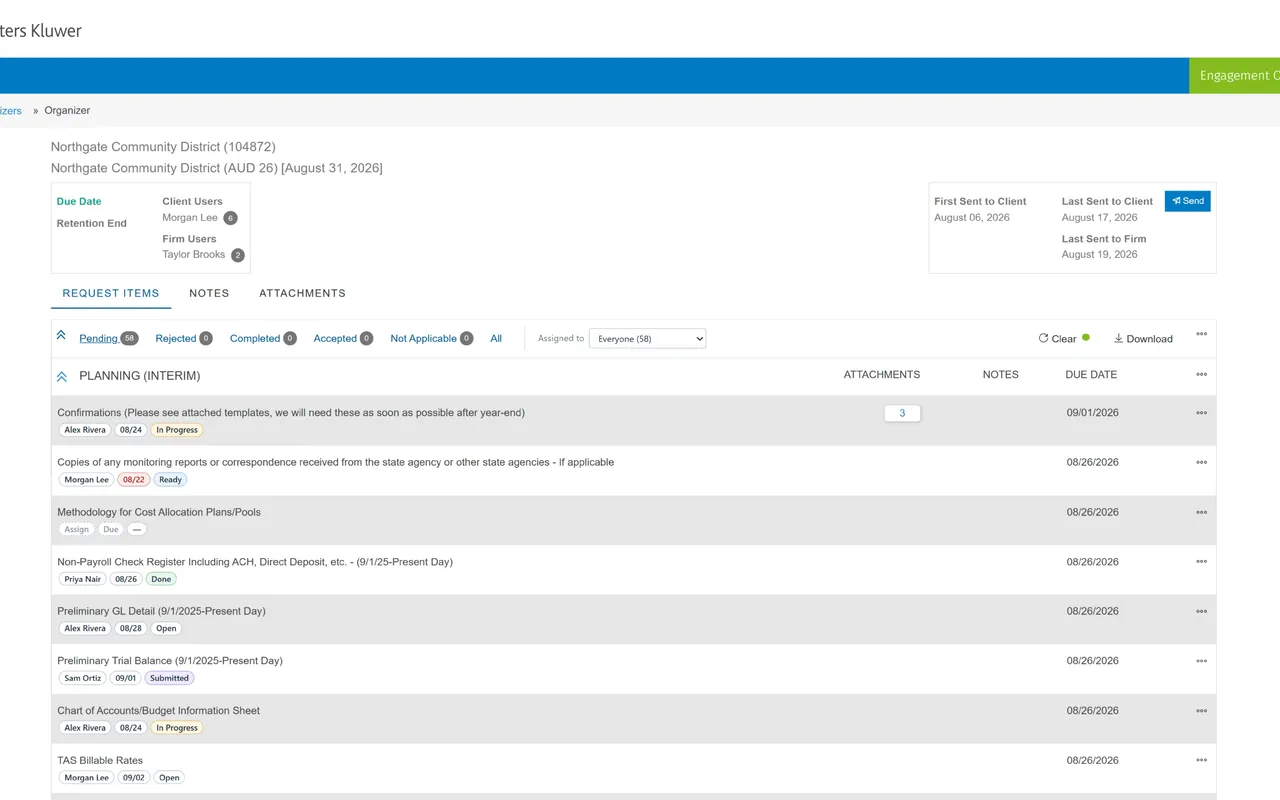
A Chrome extension that draws the missing half directly onto the page the team is already looking at. Every request item picks up three chips: who owns it, your internal due date, and status. Click a chip to change it. An Assigned to filter sits beside the organizer's own tabs, so "Pending + My items" is one click — a view the built-in tabs can't express, because they're a single axis and this is two.
Behind it, a Google Apps Script the client deploys against their own sheet. It stores the assignments and sends the email nobody wants to send by hand: a notice when you're assigned something, a nudge three days out, a daily one once you're overdue, a Monday digest of everything still open, and a daily digest of what moved and what's overdue for whoever is running the engagement.
The toolbar icon earns its place too: a menu that opens the shared sheet and the connection settings — the two places a person actually needs to reach — served from cache so a sheet that's briefly unreachable doesn't take the link away.
Status stays honest without anyone maintaining it twice. Mark an item Completed in CCH and the tracker moves to Submitted; reminders stop. If the auditor rejects it, it drops back to In Progress and the reminders resume — because a rejected item is work again, and that's exactly the moment a tracker usually goes stale.
Two decisions worth the trouble
The extension never writes to CCH. It reads the request list the page has already loaded and renders on top of it. Nothing goes back to the firm, nothing changes in the engagement, and the auditor sees exactly what they'd see without it. That constraint was the whole design brief: a client-side tool has no business editing the record of an audit.
There is no backend. No server, no database, no account to create — and no vendor holding a finance team's audit data. It lives in a Google Sheet the client already owns, inside the Google Workspace they're already governed by. Applause Consulting operates nothing and receives nothing; there's a privacy policy saying so because the Chrome Web Store requires one, but the architecture is what actually makes it true.
The part you don't see
The CCH organizer has no public API, so the request list had to be read the way the page itself reads it — a documented reverse-engineering pass over the endpoints the page already calls, with a strict allowlist so the extension forwards those and nothing else. Then the unglamorous rest: a setup flow that validates the sheet before it will save anything, so a mistyped secret fails at paste time rather than silently on the first assignment; permission justifications written for a Web Store reviewer who will reasonably ask why an extension wants three host permissions; and notes on what breaks the next time Wolters Kluwer ships a redesign, because it will.
Built for a finance team going into audit season with more request items than people. Details and setup on the Audit Helper page.
Start your projectNot affiliated with, or endorsed by, Wolters Kluwer or CCH.